2023 年,许多先进的开源 LLM 已经发布,但将这些人工智能模型部署到生产中仍然是一项技术挑战。本文将介绍如何在 AWS EC2 上部署一些最好的 LLM:LLaMA 3 70B、Mistral 7B 和 Mixtral 8x7B。我们将使用支持批量推理的高级推理引擎,以最大限度地提高吞吐量:vLLM。

2023 年,许多先进的开源 LLM 已经发布,但将这些人工智能模型部署到生产中仍然是一项技术挑战。本文将介绍如何在 AWS EC2 上部署一些最好的 LLM:LLaMA 3 70B、Mistral 7B 和 Mixtral 8x7B。我们将使用支持批量推理的高级推理引擎,以最大限度地提高吞吐量:vLLM。
Meta 创建并推出了 LLaMA 3 系列大型语言模型 (LLM),其中包括各种经过预训练和微调的生成文本模型。这些模型大小不一,参数在 70 亿到 700 亿之间。
Mistral AI 是一家由曾在谷歌 DeepMind 和 Meta 工作过的人员共同创办的初创公司,它凭借 Mistral 7B 和 Mixtral 8x7B 相继进入法律硕士领域。
Mistral 7B 令人印象特别深刻的是它的性能。在各种测试中,它的性能超过了 Llama2-13B,甚至在许多指标上超过了 Llama1-34B。这表明,Mistral 7B 以更低的计算开销提供了类似或更好的功能。在编码任务方面,Mistral 7B 可与 CodeLlama 7B 相媲美,其 13.4 GB 的小巧体积使其能够在标准机器上运行。
Mixtral 8x7B 是一款适应性强、速度快的机型,适合各种应用。它的运行速度比 LLaMA 3 70B 快六倍,在所有测试指标上都达到或超过 LLaMA 3 70B 的性能。该型号支持多种语言,具有固有的编码能力。它可以管理长度达 32kk 字元的序列。
所有这些模型都是开源的,如果你能获得合适的硬件,就可以在自己的服务器上部署它们。让我们看看如何使用 vLLM 在 AWS EC2 上部署它们。
vLLM 是为高效 LLM 推理和部署量身定制的一个快速、用户友好的库。vLLM 的性能来自于几项先进技术,如用于有效管理注意力键和值内存的分页注意力、实时批量处理传入查询以及定制的 CUDA 内核。
此外,vLLM 还通过分布式推理(通过张量并行)、输出流以及 NVIDIA 和 AMD GPU 架构的兼容性,提供了良好的灵活性。
vLLM 尤其有助于部署 LLaMA 3、Mistral 和 Mixtral,因为它可以让我们在嵌入多个较小 GPU(如英伟达 A10)的 AWS EC2 实例上部署我们的模型,而不是单个大 GPU(如英伟达 A100 或 H100)。此外,vLLM 还能让我们通过批量推理大幅提高模型的吞吐量。
部署 LLM 是一项挑战,原因有很多:VRAM(GPU 内存)使用率、推理速度、吞吐量、磁盘空间使用率......在这里,我们需要确保在 AWS EC2 上提供一个 GPU 实例,该实例有足够的 VRAM 来运行我们的模型。
G5 实例是一个不错的选择,因为它们可以让你访问现代英伟达™(NVIDIA®)A10 GPU,并可扩展至 192 GB 的 VRAM(请参阅 g5.48xlarge 实例),同时保持相当高的成本效益。
Mistral 7B 是最容易部署的型号,因为它需要大约 14GB 的 VRAM。然后是 Mixtral 8x7B(110GB)和 LLaMA 3 70B(140GB)。在这里,我们只考虑 fp16,而不是 fp32,而且我们没有应用任何量化。
因此,Mistral 7B 可以在 g5.xlarge 实例上运行,但 Mixtral 8x7B 和 LLaMA 3 70B 需要 g5.48xlarge 实例,所以我们将在本教程中提供 g5.48xlarge 实例。
要配置此类实例,请登录 AWS EC2 控制台并启动一个新实例:在 g5.48xlarge 实例上选择英伟达深度学习 AMI。您至少需要 300GB 的磁盘空间。
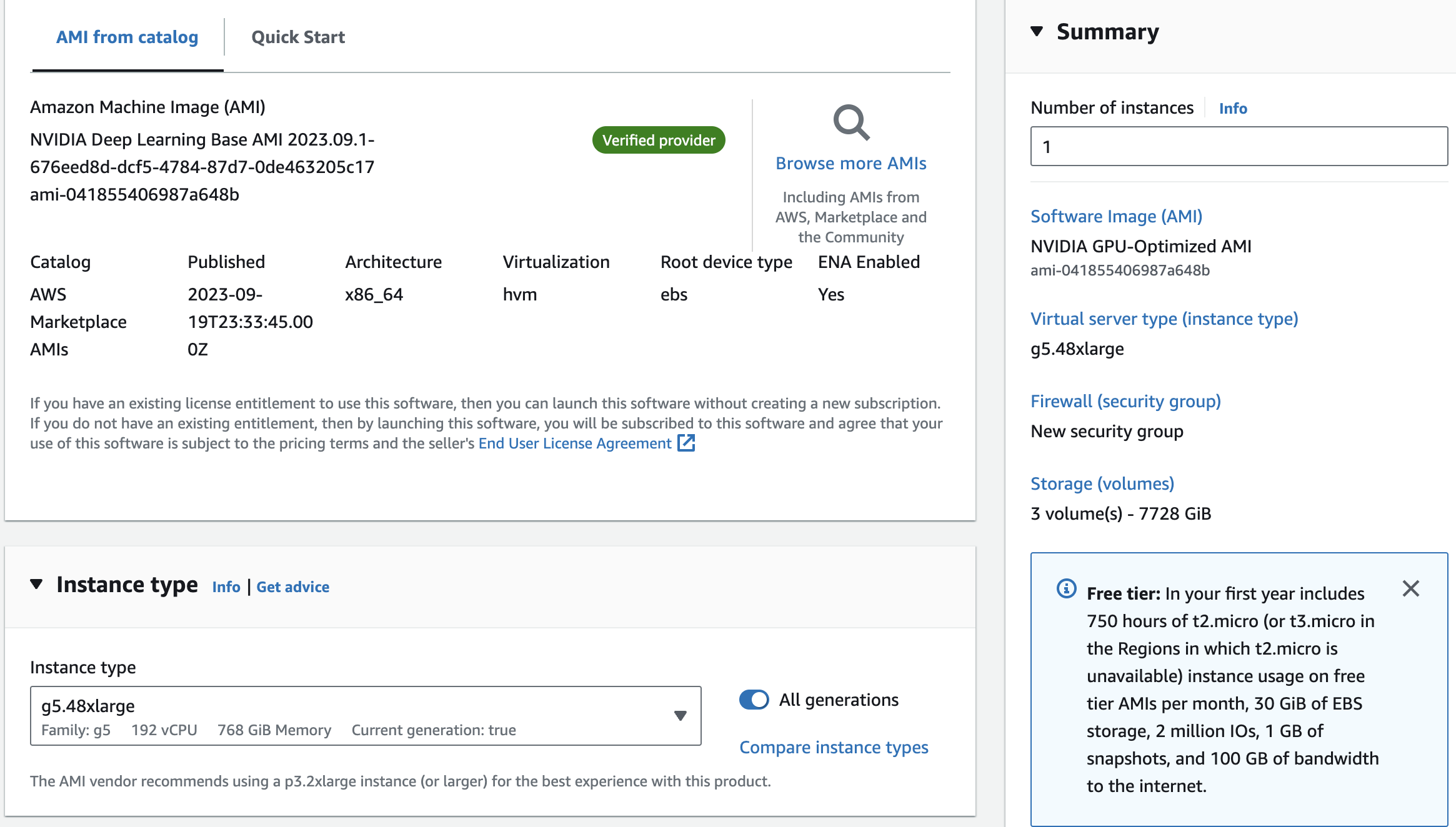
vLLM 的安装非常简单。让我们打开 SSH 连接到新创建的 AWS 实例,然后使用 pip 安装 vLLM:
pip install vllm由于我们将在 8 x A10 GPU 上使用 vLLM 进行分布式推理,因此还需要安装 Ray:
pip install ray如果在安装过程中出现兼容性问题,从源代码构建 vLLM 或使用其 Docker 镜像可能会更方便: 更多详情,请参阅安装文档。
现在您可以创建第一个推理脚本了。创建一个包含以下内容的 Python 文件:
from vllm import LLM

# Replace the model name with the one you want to use:
# Mixtral simple: mistralai/Mixtral-8x7B-v0.1
# Mixtral instruct: mistralai/Mixtral-8x7B-Instruct-v0.1
# Mistral 7B simple: mistralai/Mistral-7B-v0.1
# Mistral 7B instruct: mistralai/Mistral-7B-Instruct-v0.1
# LLaMA 3 70B: meta-llama/Llama-2-70b-hf
llm = LLM("mistralai/Mixtral-8x7B-Instruct-v0.1", tensor_parallel_size=8)

print(llm.generate("What is batch inference?"))
现在用 Python 运行您的脚本,它将返回类似这样的内容:
Batch inference is the process of applying machine learning models to a batch of data inputs all at once, rather than processing each input individually in real-time. In batch inference, a large set of inputs is collected and then processed together as a group, or "batch," by the machine learning model.

Batch inference is often used in scenarios where real-time predictions are not required, and where there is a large volume of data that needs to be processed. It can be more efficient and cost-effective than real-time inference, as it allows for the efficient use of computing resources and can reduce the latency associated with processing individual inputs.

Batch inference is commonly used in applications such as image recognition, natural language processing, and predictive analytics. For example, a company might use batch inference to analyze customer data and generate insights about purchasing patterns, or to analyze sensor data from industrial equipment to identify potential maintenance issues.

In summary, batch inference is the process of applying machine learning models to a batch of data inputs all at once, as an alternative to real-time inference. It is commonly used in scenarios where real-time predictions are not required and where there is a large volume of data that needs to be processed efficiently.
如您所见,这只是小菜一碟。你必须根据底层 GPU 的数量来调整 tensor_parallel_size。
以上是一次性场景。现在,我们要启动一个合适的推理服务器,它可以处理多个请求并即时执行批量推理。首先,启动服务器:
python -m vllm.entrypoints.openai.api_server \
--model mistralai/Mixtral-8x7B-Instruct-v0.1
--tensor-parallel-size 8
一段时间后,一旦模型正确加载到 VRAM 中,就可以打开第二个 shell 窗口并提出一些请求:
curl http://localhost:8000/v1/completions \
-H "Content-Type: application/json" \
-d '{
    "model": "mistralai/Mixtral-8x7B-Instruct-v0.1",
    "prompt": "What is batch inference?"
}'
这将返回与之前相同的结果,但这次您可以同时执行多个请求。
如果您想最大限度地利用 GPU 并轻松地在多个 GPU 上并行部署模型,利用 vLLM 这样的高级推理服务器将大有裨益。
正如您所看到的,借助这种技术,在自己的服务器上部署最先进的开源人工智能模型(如 LLaMA 3、Mistral 和 Mixtral)变得非常容易。
在本教程中,我们使用了 AWS EC2,当然也可以使用其他供应商的产品。主要的挑战在于 GPU 的成本及其可用性。
如果您不想自己部署此类 LLM,我们建议您使用我们的 NLP Cloud API。这将为您节省大量时间,甚至可能比您自己部署 LLM 更便宜。 如果尚未完成,请随时尝试!
Vincent
NLP Cloud 开发人员倡导者