GPT-3, GPT-J, GPT-NeoX와 같은 훌륭한 AI 모델 덕분에 Discord 서버에서 챗봇을 구축하는 것은 매우 쉽습니다. 이 글에서는 NLP 클라우드 API를 통해 GPT-J와 GPT-NeoX를 사용하여 Node.js에서 나만의 대화형 봇을 코딩하는 방법을 보여드리겠습니다.

GPT-3, GPT-J, GPT-NeoX와 같은 훌륭한 AI 모델 덕분에 Discord 서버에서 챗봇을 구축하는 것은 매우 쉽습니다. 이 글에서는 NLP 클라우드 API를 통해 GPT-J와 GPT-NeoX를 사용하여 Node.js에서 나만의 대화형 봇을 코딩하는 방법을 보여드리겠습니다.
Discord는 널리 채택된 메시징 플랫폼입니다. 커뮤니티가 쉽게 모일 수 있도록 프로젝트를 위한 자체 Discord 서버를 만드는 사람들이 점점 더 많아지고 있습니다. 실제로 많은 회사에서 자체 사용자 커뮤니티를 육성하기 위해 자체 Discord 서버를 만들기도 합니다.
Discord는 자체 호스팅하거나 Discord 웹 애플리케이션을 통해 사용할 수 있습니다. Discord의 가장 큰 장점은 서버와 상호작용할 수 있는 광범위한 API가 있으며, Discord에서 사용자와 상호작용할 챗봇을 매우 쉽게 만들 수 있다는 점입니다.
많은 사람들이 Discord에서 챗봇을 만들어 사용자들이 인공지능과 다양한 주제에 대해 토론할 수 있도록 합니다. 챗봇을 Discord 서버에 통합하는 것은 매우 쉽습니다. 어떻게 하는지 살펴봅시다!
지난 2년 동안 몇 가지 훌륭한 AI 모델이 출시되었습니다: GPT-3, GPT-J, GPT-NeoX가 바로 그것입니다. 이 모델들은 매우 인상적이며 특히 대화형 AI(즉, 챗봇)를 처리하는 데 탁월합니다.
이러한 모델을 사용하면 말 그대로 모든 주제에 대해 훌륭한 토론을 할 수 있으며 특정 상황에 맞게 모델을 조정하는 것도 매우 쉽습니다. 예를 들어, 의료, 법률, 마케팅 등 특정 산업에 대한 특정 질문에 공감하거나 비꼬거나 심지어 능숙하게 답변하도록 GPT 기반 챗봇을 구성할 수 있습니다.
유일한 문제는 이러한 모델에는 많은 계산 능력이 필요하기 때문에 실제로 자체 서버에 배포할 수 있는 사람은 거의 없다는 것입니다. NLP Cloud는 API를 통해 GPT-J와 GPT-NeoX를 모두 제안하므로 다음 예제에서는 NLP Cloud API를 통해 이러한 모델을 사용하겠습니다.
Discord.com에서 계정을 만들었다고 가정해 보겠습니다. 개발자 포털로 이동합니다: 여기. '새 애플리케이션'을 선택하고 애플리케이션 이름을 지정한 다음 생성합니다:
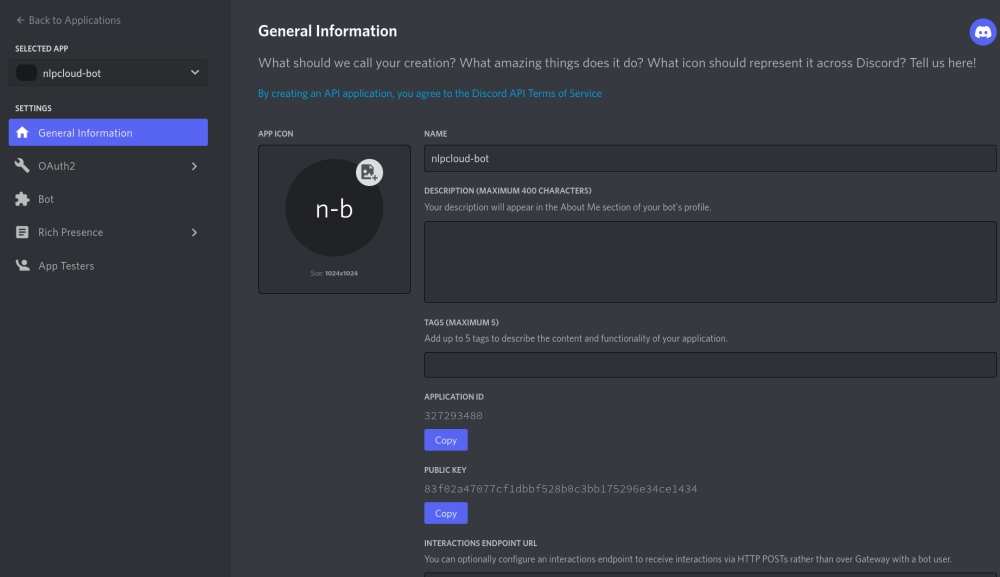
이제 "봇 추가"를 클릭하고 봇 토큰을 검색합니다.
마지막 단계: 봇을 Discord 서버에 연결합니다. 이렇게 하려면 먼저 "OAuth2" 메뉴를 클릭하고 클라이언트 ID를 검색합니다:
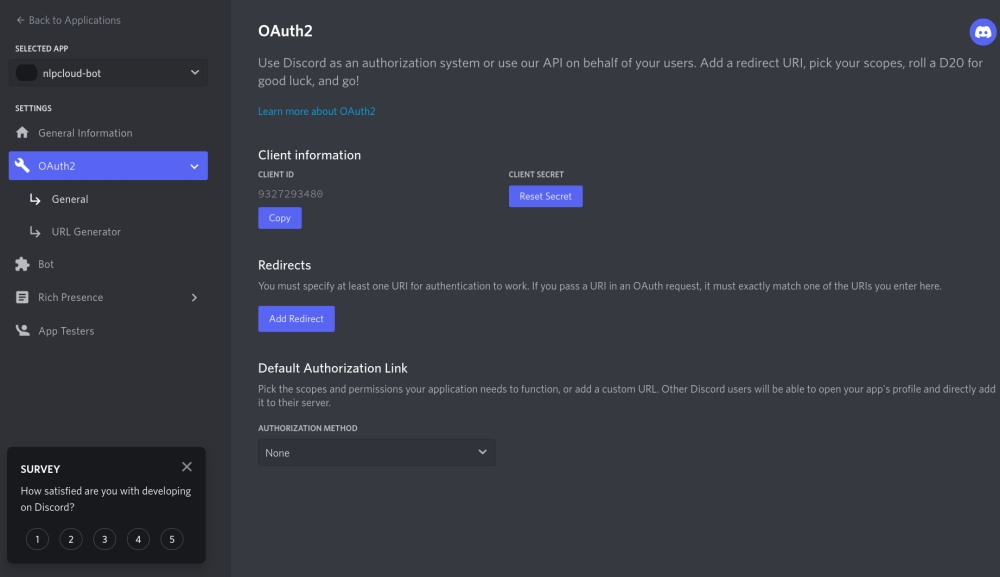
그런 다음 다음 URL(https://discord.com/oauth2/authorize?scope=bot&permissions=8&client_id=CLIENT_ID)을 방문하여 봇이 서버에 액세스할 수 있도록 허용합니다(CLIENT_ID를 앞서 검색한 자신의 클라이언트 ID로 대체).
디스코드 측에서는 모든 것이 정상입니다. 이제 NLP 클라우드 API 토큰을 검색해 보겠습니다!
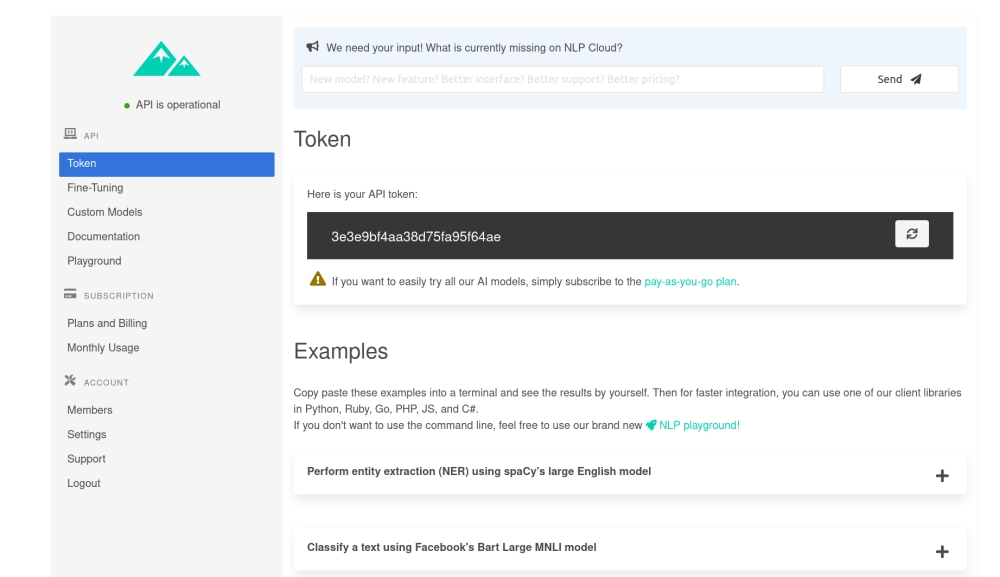
NLP Cloud에서 계정을 생성했다고 가정해 보겠습니다. 대시보드에서 API 토큰을 검색하기만 하면 됩니다:
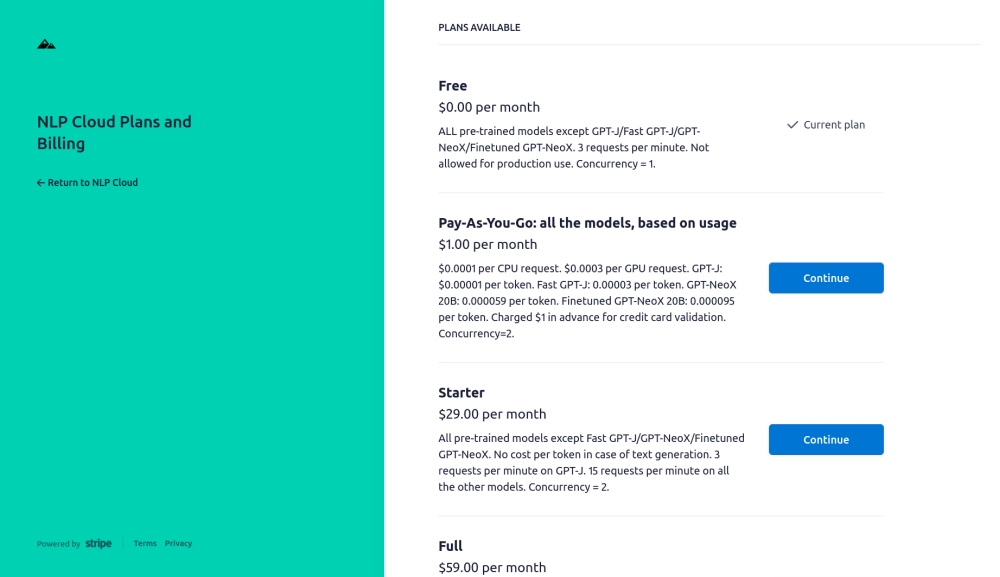
그런 다음 종량제 플랜에 가입하면 GPT-J 및 GPT-NeoX 모델에 액세스할 수 있습니다(처음 10만 토큰은 무료이므로 테스트가 더 쉬워집니다).
이제 Node.js 봇 코딩을 시작할 수 있습니다!
Discord와 NLP 클라우드에는 모두 Node.js 클라이언트가 있으므로 개발이 매우 쉬워집니다.
다음은 첫 번째 버전입니다:
const NLPCloudClient = require('nlpcloud');
const { Client, Intents } = require('discord.js');

// Load NLP Cloud token and Discord Bot token.
const nlpcloudToken = process.env.NLPCLOUD_TOKEN;
if (nlpcloudToken == null) {
    console.error('No NLP Cloud token received');
    process.exit();
}
const discordBotToken = process.env.DISCORD_BOT_TOKEN;
if (discordBotToken == null) {
    console.error('No Discord bot token received');
    process.exit();
}

// Initialize the NLP Cloud and Discord clients.
const nlpCloudClient = new NLPCloudClient('fast-gpt-j', nlpcloudToken, true)
const discordClient = new Client({intents: [Intents.FLAGS.GUILDS, Intents.FLAGS.GUILD_MESSAGES]});

let history = [];

discordClient.on("messageCreate", function(message) {
    if (message.author.bot) return;

    (async () => {
        // Send request to NLP Cloud.
        const response = await nlpCloudClient.chatbot(`${message.content}`, '', history);

        // Send response to Discord bot.
        message.reply(`${response.data['response']}`);

        // Add the request and response to the chat history.
        history.push({'input':`${message.content}`,'response':`${response.data['response']}`});

    })();
});
보시다시피 먼저 환경 변수에서 Discord 및 NLP 클라우드 토큰을 검색합니다. 따라서 먼저 "NLPCLOUD_TOKEN"과 "DISCORD_BOT_TOKEN"이라는 두 개의 환경 변수에 토큰을 내보내세요. 원하는 경우 테스트 중에 코드에 직접 토큰을 복사하여 붙여넣을 수도 있습니다.
저희는 일반적으로 응답 시간이 가능한 한 짧기를 원하기 때문에 챗봇에 적합한 NLP Cloud의 빠른 GPT-J 모델(GPT-J를 더 빠르게 구현한 모델)을 사용하고 있습니다. GPT-NeoX 20B를 사용하려면 "fast-gpt-j" 대신 "gpt-neox-20b"를 사용하면 됩니다.
NLP Cloud의 "chatbot()" 함수를 사용하면 복잡한 매개 변수, 프롬프트, 소수 학습 등에 신경 쓰지 않고도 GPT 모델 기반의 챗봇을 쉽게 처리할 수 있습니다(아래에서 chatbot() 함수 대신 generation() 함수를 사용하는 다른 예시를 참조하세요). 유일한 비결은 각 챗봇 응답 후 해당 응답을 메모리에 보관하고 다음 요청에 대한 기록에 추가해야 한다는 것입니다. 그렇게 하지 않으면 챗봇이 대화의 기록을 기억하지 못합니다!
이제 챗봇이 작동합니다. 스크립트를 실행하기만 하면(예를 들어, "node my_script.js"로) 챗봇이 Discord 서버에서 온라인 상태인 것을 확인할 수 있습니다. 이제 챗봇과 실제로 대화를 시작할 수 있습니다!
이 예제는 작동하지만 약점이 있습니다: GPT 모델은 동시에 2048개 이상의 토큰을 처리할 수 없습니다(2048개 토큰은 1700단어와 거의 같음). 따라서 어느 시점에서 챗봇 기록이 너무 커져서 잘라내야 할 수도 있습니다! 그 방법은 다음과 같습니다:
const NLPCloudClient = require('nlpcloud');
const { Client, Intents } = require('discord.js');

// Load NLP Cloud token and Discord Bot token.
const nlpcloudToken = process.env.NLPCLOUD_TOKEN;
if (nlpcloudToken == null) {
    console.error('No NLP Cloud token received');
    process.exit();
}
const discordBotToken = process.env.DISCORD_BOT_TOKEN;
if (discordBotToken == null) {
    console.error('No Discord bot token received');
    process.exit();
}

// Initialize the NLP Cloud and Discord clients.
const nlpCloudClient = new NLPCloudClient('fast-gpt-j', nlpcloudToken, true)
const discordClient = new Client({intents: [Intents.FLAGS.GUILDS, Intents.FLAGS.GUILD_MESSAGES]});

let history = [];
let charsCount = 0;

discordClient.on("messageCreate", function(message) {
    if (message.author.bot) return;

    (async () => {
        charsCount += `${message.content}`.length;

        // Send request to NLP Cloud.
        const response = await nlpCloudClient.chatbot(`${message.content}`, '', history);

        charsCount += `${response.data['response']}`.length;

        // Send response to Discord bot.
        message.reply(`${response.data['response']}`);

        // Add the request and response to the chat history.
        history.push({'input':`${message.content}`,'response':`${response.data['response']}`});

        // If the chat history is bigger than 1500 tokens, we remove the oldest elements from
        // the history. We consider that 1 token = 4 characters.
        // The theoretical GPT context limit is 2048 tokens but we choose 1500 tokens instead
        // in order to be safe since the tokens count is not perfectly accurate.
        while (charsCount > 1500 * 4) {
            charsCount -= history[0]['input'].length + history[0]['response'].length;
            history.shift();
        }
    })();
});


discordClient.login(discordBotToken);
보시다시피 우리는 단순히 기록이 너무 크지 않은지 확인하고, 기록이 너무 크면 가장 오래된 요소를 제거합니다!
실제로는 기록에서 가장 오래된 요소는 대화와 관련이 거의 없기 때문에 문제가 되는 경우가 거의 없습니다. 하지만 관련성이 있는 경우 관련성에 따라 일부 요소를 선택적으로 유지하거나 제거하는 고급 전략을 구현할 수도 있습니다.
위의 예제에서는 generation() 함수를 래퍼로 감싸는 chatbot() 함수를 사용했습니다. generation() 함수는 사용하기 조금 더 어렵지만 챗봇을 더 많이 제어할 수 있습니다. 다음은 예제입니다:
const NLPCloudClient = require('nlpcloud');
const { Client, Intents } = require('discord.js');

// Load NLP Cloud token and Discord Bot token.
const nlpcloudToken = process.env.NLPCLOUD_TOKEN;
if (nlpcloudToken == null) {
    console.error('No NLP Cloud token received');
    process.exit();
}
const discordBotToken = process.env.DISCORD_BOT_TOKEN;
if (discordBotToken == null) {
    console.error('No Discord bot token received');
    process.exit();
}

// Initialize the NLP Cloud and Discord clients.
const nlpCloudClient = new NLPCloudClient('fast-gpt-j', nlpcloudToken, true)
const discordClient = new Client({intents: [Intents.FLAGS.GUILDS, Intents.FLAGS.GUILD_MESSAGES]});

let history = `Input: Hey, how are you today?
Response: Very well thank you, what about you?
###
Input: I am great.
Response: What are you going to do?
###
Input: Most likely read a couple of book and relax.
Response: Fantastic!`;

discordClient.on("messageCreate", function(message) {
    if (message.author.bot) return;

    (async () => {
        if (history != '') {
            history += '\n###\n'
        }
        let finalContent = history+'Input: '+`${message.content}`+'\nResponse:';

        // Send request to NLP Cloud.
        const response = await nlpCloudClient.generation(finalContent,0,200,true,'###',true,true)

        // Remove end_sequence from response.
        let cleanedResponse = response.data['generated_text'].replace('###','').trim();

        // Send response to Discord bot.
        message.reply(cleanedResponse);

        // Add the request and response to the chat history.
        history = finalContent+cleanedResponse;

        // If the chat history is bigger than 1500 tokens, we remove the oldest elements from
        // the history. We consider that 1 token = 4 characters.
        // The theoretical GPT context limit is 2048 tokens but we choose 1500 tokens instead
        // in order to be safe since the tokens count is not perfectly accurate.
        if (history.length > 1500 * 4) {
            history = history.slice(charsCount-(1500 * 4));
        }

    })();
 });


discordClient.login(discordBotToken);
채팅 토론을 수동으로 초기화해야 한다는 것을 눈치채셨을 것입니다. 여기서 아이디어는 대화 모드에서 원하는 텍스트 생성 모델을 보여주기 위한 것입니다. 이 잡담은 중요하지 않으며 나머지 대화에 영향을 미치지 않도록 가능한 한 중립적이어야 합니다.
또한 생성된 각 응답의 끝에 "###"을 추가하도록 모델을 강제 설정합니다. 이렇게 하면 이러한 문자가 충족되면 텍스트 생성을 쉽게 중지할 수 있습니다.
다시 한 번 말씀드리지만, 이 예제는 고급 사용 전용입니다!
Discord와 GPT 모델 덕분에 고급 챗봇을 구축하는 것이 그 어느 때보다 쉬워졌습니다.
가장 큰 문제는 이러한 최신 AI 모델은 크기가 방대하기 때문에 사용하기가 점점 더 어려워지고 있다는 점입니다. 따라서 대신 NLP Cloud와 같은 API를 사용하는 것이 훨씬 더 간단하고 비용 효율적일 수 있습니다.
자체 챗봇을 구현하고 싶지만 어떻게 처리해야 할지 잘 모르겠다면 주저하지 마시고 문의해 주세요!
François
NLP 클라우드의 풀 스택 엔지니어